My previous blog listed the 5 main Mobile security threats for 2013. In this blog I will provide you with 10 basic steps to assure your (new) smartphone or tablets meets the minimum security features. Some of these seem so simple and obvious, that I never paid attention them, makes sense right?! Some of the steps are human behaviour others relate to generic technical knowledge.
1. Secure it:
Many of us still don’t secure our devices, by not using a PIN or passcode. Simple, effective and at least
it protects you from anyone who gets hold of it to access and use it.
2. Create a Back Up:
Whether you lose your phone or it gets stolen we all know that
it feels like you lost the most important thing in your life. It happened to me
in Moscow. I had no backups and felt completely lost! Create a back up!
3. Note Your IMEI:
IMEI is your unique 15-digit number that identifies your
phone. You can find it beneath the battery or alongside a SIM card slot. The
number provides Law Enforcement Agencies and sites like EBay.com a way to
identify your phone (if it is put up for sale in an auction or brought into a Police station). The number will confirm your ownership! Note it down and store it somewhere safe too you!
4. Security software (Anti-Vius):
We all know and most of us use Anti-Virus. Additionally such
packages offer features like device tracking, remote lock and wipe, anti-phishing protection.
Interested? CLICKHERE to go to the 2013 Top 10 Mobile Security Software
review. Money well spend!!
5. Tracking:
Accurate to a number of metres, modern tracking software is
included in the best mobile security offerings, but is also built in to certain
mobile platforms. Windows Phone's 'Find My Phone' and iOS' 'Find My iPhone'
options should always be activated on devices. It uses tracking software using
the phone's built-in data connection. CLICK HERE for the TOP 10
TRACKING Mobile Software. Get Familiar with your phones' capabilities!
6. Verify Your Monthly Phone Bill:
Make sure you verify your monthly statement, due to certain
malware (read my
previous blog) that will make use of your device. If you spot it any
strange amounts on your statement immediately contact you service provider.
It might take you a bit of time, but will save you money!
7. Smart Surfing:
The most secure data connection you should use on a Mobile
Device is provided by your Mobile Provider. Free WIFI-Hot Spots are pose an
increased security risk, best is verify if the WIFI-Hotspot provides a secure
channel. Be Aware but not affraid!
8. Be Aware of specific threats:
Especially Andriod operated systems will be targeted in 2013
(as described in my
previous blog, boy it gets boring), but if you own a mobile device
operating on Windows or Apple's IOS the security risks are more or less the
same as with an Android operated Mobile Device!!! Try to follow the latest developments for instance on twitter or via newsletters from your security or mobile provider!
9. Check BYOD Policies
If you use your device at work, over a company network, or
for anything related to work, be sure to ask your IT department for any mobile
use policies. It might be that your employer requires some control of the work
data you have on your device, or may ask you to abide by certain
practices. BYOD is basically a two-way relationship: it provides the
employee and increased flexibility and mobility which benefits the employer. Verify how it impacts you as a user and how it impacts your employer or employees!
10. Treat your mobile device like
you wallet, mind it carefully!
Don't leave your device unattended whilst going to the bathroom or chatting to somebody at a conference!
The 10 basic security steps for a new (or already operating) Mobile Device are shockingly easy, but how many of the above boxes can you tick as "Done"?
Link to this post: http://mcommerce-explorer.blogspot.com/2013/03/10-basic-security-steps-for-smartphones.html#links
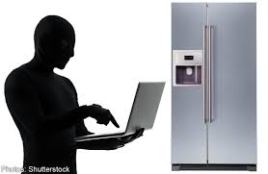 On the 16th of January 2014 Proofpoint (Leading Security Firm) claims to have uncovered what could be the first proven Internet of Things (IoT)-based cyberattack involving conventional household “smart” appliances. The global attack campaign involved more than 750,000 malicious email communications coming from more than 100,000 everyday consumer gadgets such as home-networking routers, connected multi-media centers, televisions and at least one refrigerator (What? A FRIDGE!) that had been compromised and used as a platform to launch attacks.
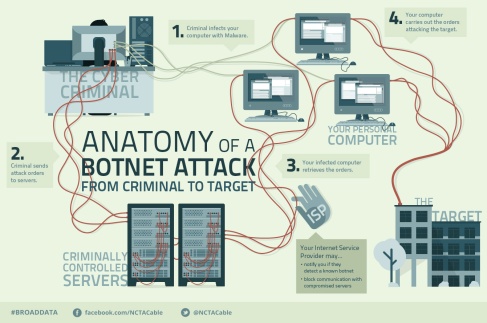 Just as personal computers can be unknowingly compromised to form robot-like “botnets” that can be used to launch large-scale cyberattacks, Proofpoint’s findings alledge that cyber criminals have begun to commandeer home routers, smart appliances and other components of the Internet of Things and transform them into “thingbots” to carry out the same type of malicious activity. Cyber criminals intent on stealing individual identities and infiltrating enterprise IT systems have found a target-rich environment in these poorly protected internet connected devices that may be more attractive and easier to infect and control than PC, laptops, or tablets.
