Passwords are the weak link for companies of all sizes, but many small and midsize businesses (SMBs) rely on their workers to make the right choice in selecting strong passwords.
While establishing a password policy and educating workers are good first steps, they are not sufficient to convince users to select good passwords.
SMBs frequently inherit their employees' selection of passwords, and while three-quarters of workers choose passwords for security, they also compromise to more efficiently gain access to their accounts.
"A business is only as strong as its weakest link, or weakest password connected to that business, whether belonging to a customer, partner or employee," CSID stated in the report.
Here are 4 Ways for businesses to increase password security
 |
| Mozakdesign.com |
1. Create visibility
SMBs generally have no idea the strength of the passwords that their employees are using on internal systems, whether they are reusing the passwords on external services or how many different passwords they have. The first step for businesses to gain visibility should be to adopt a central system for managing employees credentials, whether a password-management service in the cloud or full identity and access management (IAM) solution.
Without such a system, companies will be blind as to the degree of risk they have, LastPass's Siegrist says.
"The scary thing is that most people don't know any better, so if you don't have any tools or procedures in place, you just have no shot of getting to a safe place," he says.
LastPass for instance, gives each employee's account a security score based on their currently stored passwords. While company administrators cannot access the passwords themselves, they can discover when a worker is not following policy.
2. Centralize password management
Even for companies that do not need a full IAM system, the centralized management of employees' passwords goes beyond just gaining insight into workers' password habits. Companies that have administrative control over their employees' accounts can add new workers and delete old ones who no longer work at the firm, heading off the risk from disgruntled employees.
"As companies grow, even to 50 or 100 users, tracking where they've added users have added accounts into different applications not only becomes a burdensome process, but can also become expensive," says Patrick Harding, chief technology officer of Ping Identity, a cloud identity provider.
Ping's product eliminates passwords for many cloud applications by using a single sign-on approach that replaces passwords with Security Assertion Markup Language (SAML) to securely access online accounts.
 |
| Liebsoft.com |
3. Pick a single entry point
In addition to centralizing the administration of the identity storage, companies can benefit from simplifying a user's need to enter in a credential to a single login event. By limiting the number of times a user has to enter in a password, companies can make their workers more efficient and focus on a single channel to secure, Harding says.
"If you only have to authenticate once a day, make that authentication stronger than a password, even a strong password," he says.
Using two-factor authentication for an e-mail account can double as the log-in credentials for the single sign-on system.
4. Change employee behavior
Finally, companies should use any improvements in their management of passwords to educate them about good passwords selection, LastPass's Siegrist says. When employees reuse a password, remind them of company policy against reuse. If workers have not updated old passwords, then remind them to do so, he says.
"You can set policies to perfectly customize how safe you want your employees to be, and know that they are doing it,"Siegrist says.
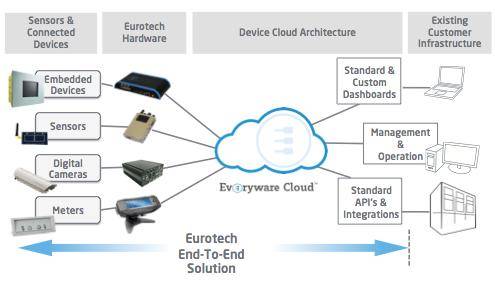 Most systems targeting the Internet of Things (IoT) utilize web-based cloud services to link users to devices and their data. But the Net, with its http and graphical interfaces, may not always be needed. At least one company has created an IoT device that communicates via simple text messaging.